HoReCa · Kitchen Display
Orders from table to kitchen in real time. Stop-list synced in milliseconds.
EFRION KDS shares one backend with EFRION POS — no middleware, no sync lag. Ticket time drops 20–30% from the first shift. The stop-list is a single truth, not a phone call.
−20–30%
Ticket time reduction
Toast 2025
−70–85%
Order errors
Toast 2025
+10–20%
Table turnover
Lavu 2025
0 lag
Stop-list sync with POS
Native backend
What EFRION KDS solves
A KDS from a different vendor means a separate subscription, a separate SLA, and a sync delay between POS and kitchen. When the POS and KDS share a backend, the stop-list is one object — not two systems trying to stay in sync.
One backend, zero lag
EFRION KDS and POS share the same data layer. A ticket created at the POS terminal appears on the kitchen screen in under 100ms — no polling, no middleware.
Stop-list is a single truth
When a chef marks an item as stopped on the KDS screen, it disappears from the active menu in POS instantly. No phone call. No second system to update.
Ticket time as a managed KPI
Color-coded timers and per-station analytics turn "approximately 12 minutes" into a measurable, actionable number. Station bottlenecks surface in the manager app.
What's included
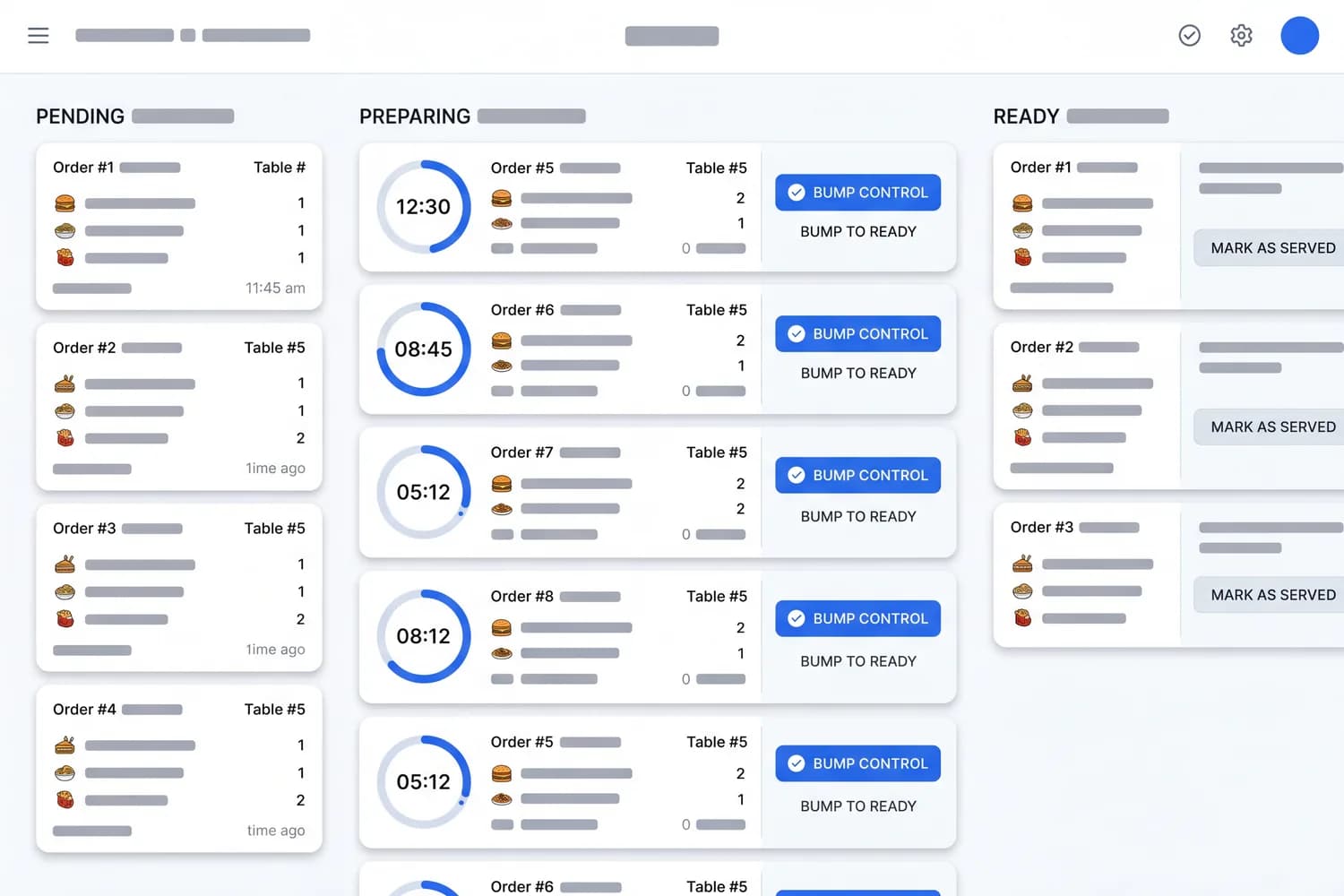
- Real-time ticket routing from POS to bar, kitchen, and pastry stations
- Color-coded ticket timer: green → yellow → red at threshold breach
- Modifiers, special requests, and allergens in a highlighted block
- Stop-list: mark from KDS screen → syncs instantly to POS
- Expo screen: unified view of all stations for expeditor control
- Bump by ticket or by item — partial readiness supported
- Kitchen analytics: avg ticket time per station, per shift
- Multi-screen: one backend, any number of screens across stations
- Sound and visual alerts configurable to kitchen noise levels
How it compares to the market standard
| Status quo | EFRION |
|---|---|
| Third-party KDS is a separate subscription with its own SLA and sync lag to POS | Same backend as POS — one subscription, one SLA, zero sync lag |
| Stop-list update: chef shouts → manager calls → POS updated manually | Stop marked on KDS → instant sync to POS, no intermediate step |
| Ticket time is tracked 'approximately' and 'by feel' | Exact measurement per station with auto-alert when threshold exceeded |
| Expo control = head chef physically standing at pass | Expo screen: full station status + ready notification pushed to POS |
| Kitchen analytics = Excel export after the fact | Real-time analytics in manager mobile app — same login as POS |
Industry data on integrated kitchen display systems
Restaurants integrating KDS on the same backend as POS eliminate the lag between order placed and order displayed — the primary source of kitchen miscommunication and ticket errors.
−20–30%
Ticket time — integrated KDS vs paper
Toast, 2025
−70–85%
Order errors (wrong item, missed modifier)
Toast, 2025
+8%
Revenue YoY — integrated order management
Toast, 2025
Pricing
Annual contract: −20%. Add-ons: Expo screen $8/loc, Analytics $12/loc.
Core
$20
per location / month
Tickets from POS, station routing, color timer, stop-list, bump, 2 KDS screens
Growth
$40
per location / month
Core + multi-screen, expo screen, kitchen analytics, API read, 6 KDS screens
Scale
$75
per location / month
Growth + multi-location KDS dashboard, AI load forecasting, SLA 99.9%
Frequently asked questions
Does EFRION KDS require EFRION POS?
KDS works natively with EFRION POS on a shared backend — zero middleware, zero sync lag. It can also connect to third-party POS systems via API, though the native integration delivers the full feature set.
How does the stop-list work?
A chef marks an item as stopped directly on the KDS screen. The update propagates to EFRION POS instantly — the waiter sees the stop without page reload or phone call.
Can we use multiple screens in different kitchen zones?
Yes. One backend supports any number of KDS screens across stations — grill, cold kitchen, bar, pastry. Each screen shows only its relevant tickets. Available on Growth tier.
How quickly does a server notice the ticket?
On Growth and Scale tiers, EFRION POS receives a push notification when the kitchen marks a table as fully ready. No walkie-talkie, no shouting.
Does KDS affect our fiscal setup?
No. KDS is an operational display — fiscal receipts and labeling are handled at the POS layer. KDS does not create or alter any fiscal documents.
Terms used on this page
- KDS
- Kitchen Display System — система отображения заказов на кухне
- POS
- Point of Sale — терминал продаж
- ERP
- Enterprise Resource Planning — система планирования ресурсов предприятия
- SLA
- Service Level Agreement — соглашение об уровне сервиса
Works with the rest of EFRION
Activate module by module on one backend and shared master data. Each pairing removes a manual hand-off between systems.
Ready to eliminate ticket chaos?
14-day free trial. First shift — you'll see the difference in ticket time.